
How to Group Trades for the Wheel and Covered Calls
A Wheel or Covered Call is more than one transaction. It may include a short put, assigned shares, several covered calls, rolls, closes, and dividends. A trade group keeps that complete history together so QuantLog can calculate the strategy’s combined premium, cost basis, break-even, and realized result.
Understand what belongs in one trade group
Use one group for transactions that belong to the same continuing strategy on the same symbol. For a Wheel, that normally means the cash-secured puts, any assignment or stock purchase, the covered calls sold against those shares, and related dividends. For a Covered Call, keep the shares and every call cycle together.
- Keep different symbols in separate groups so quantities and calculations remain meaningful
- A group tracks the complete campaign; a multi-leg trade tracks the legs of one execution or strategy cycle
- Use a clear name such as ‘AAPL Wheel — Summer 2026’ so the group is easy to recognize later
Select the related standalone trades
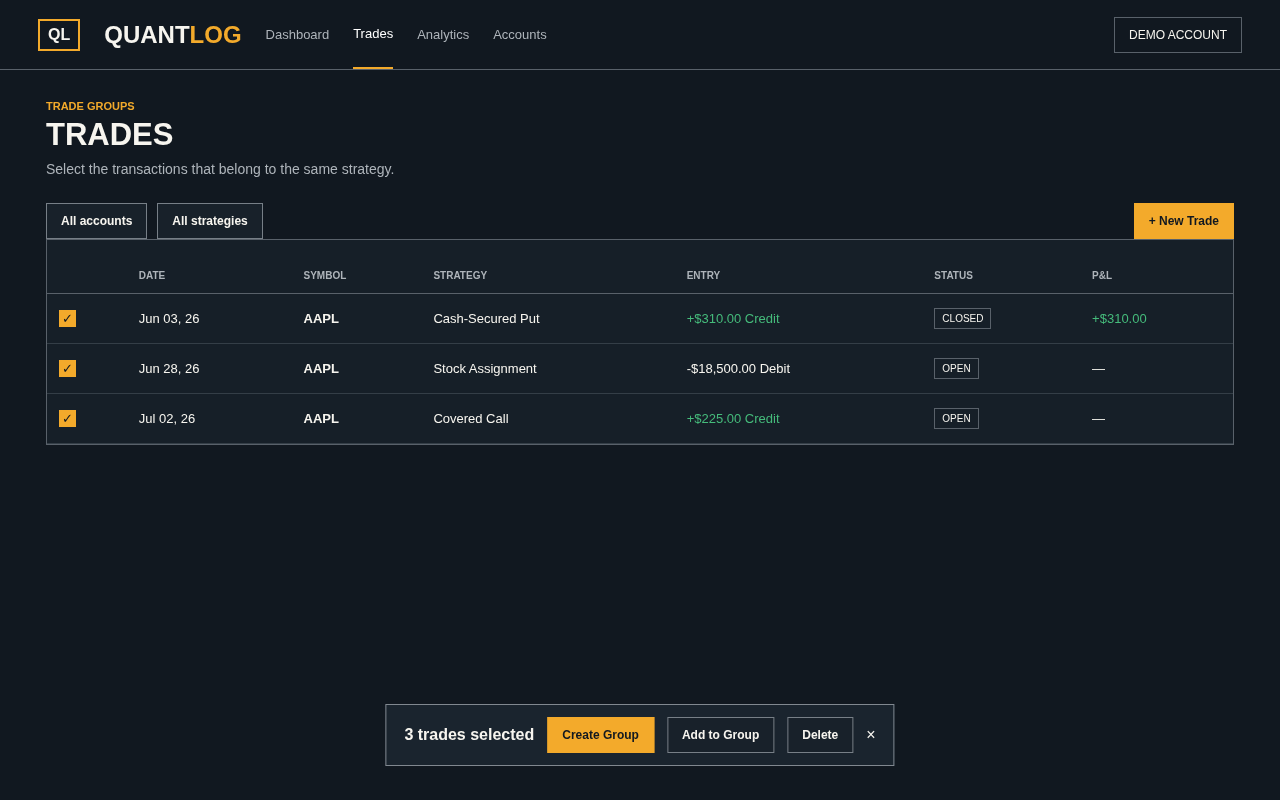
Open Trades and check the transactions you want to combine. The action bar appears when items are selected. Choose Create Group after selecting at least two items, including at least one trade.
- Select only transactions for the same symbol
- A dividend can be included as long as at least one trade is selected
- If a trade already belongs to a group, unlink it or use Move to Group instead
Create and name the strategy group
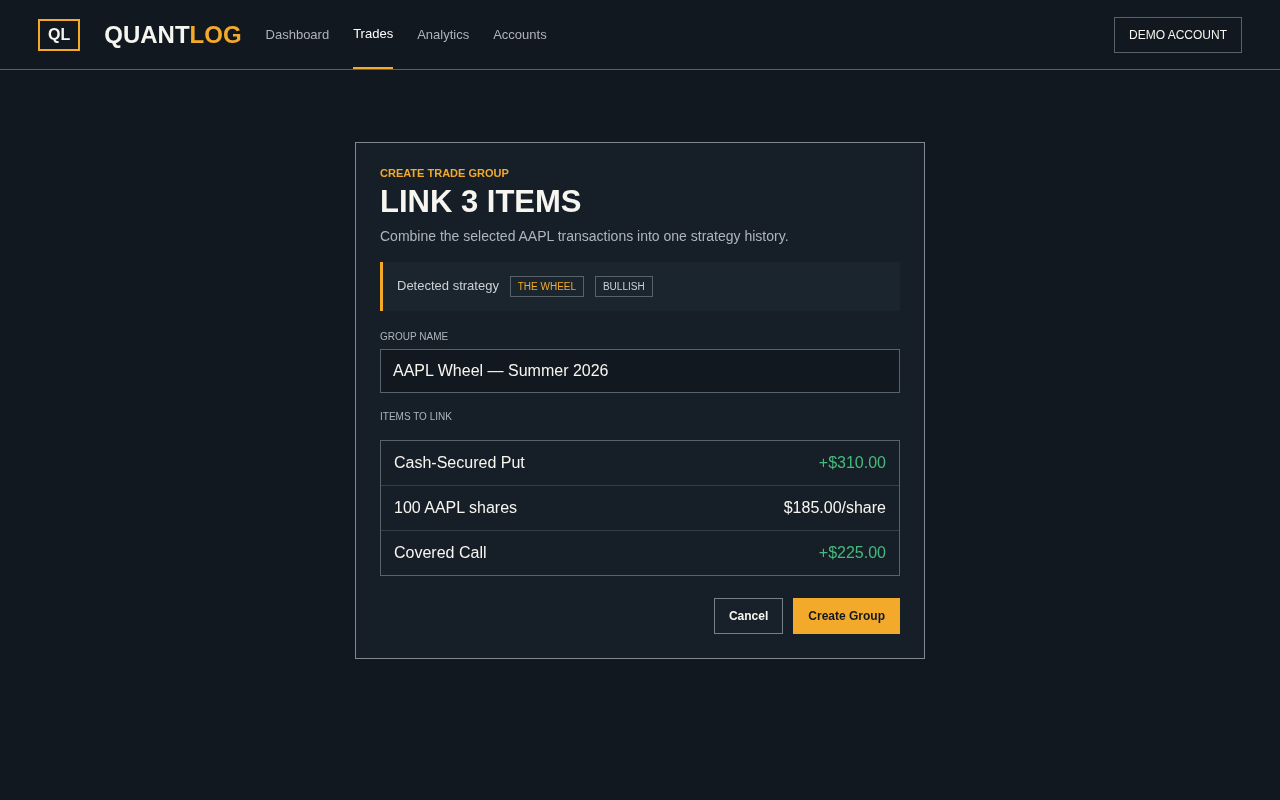
Choose Create Group. QuantLog reviews the selected legs and suggests a strategy when it recognizes the combination. Give the group a descriptive name, then confirm. The Wheel is a continuing campaign, so use The Wheel as the group type even though its individual cycles may be detected as Cash-Secured Put or Covered Call.
- Covered Call is detected when long shares and a short call are combined
- Choose The Wheel for a campaign that moves from short puts into shares and covered calls
- Use Custom when several related transactions do not fit a standard strategy label
Read premium, cost basis, and true break-even
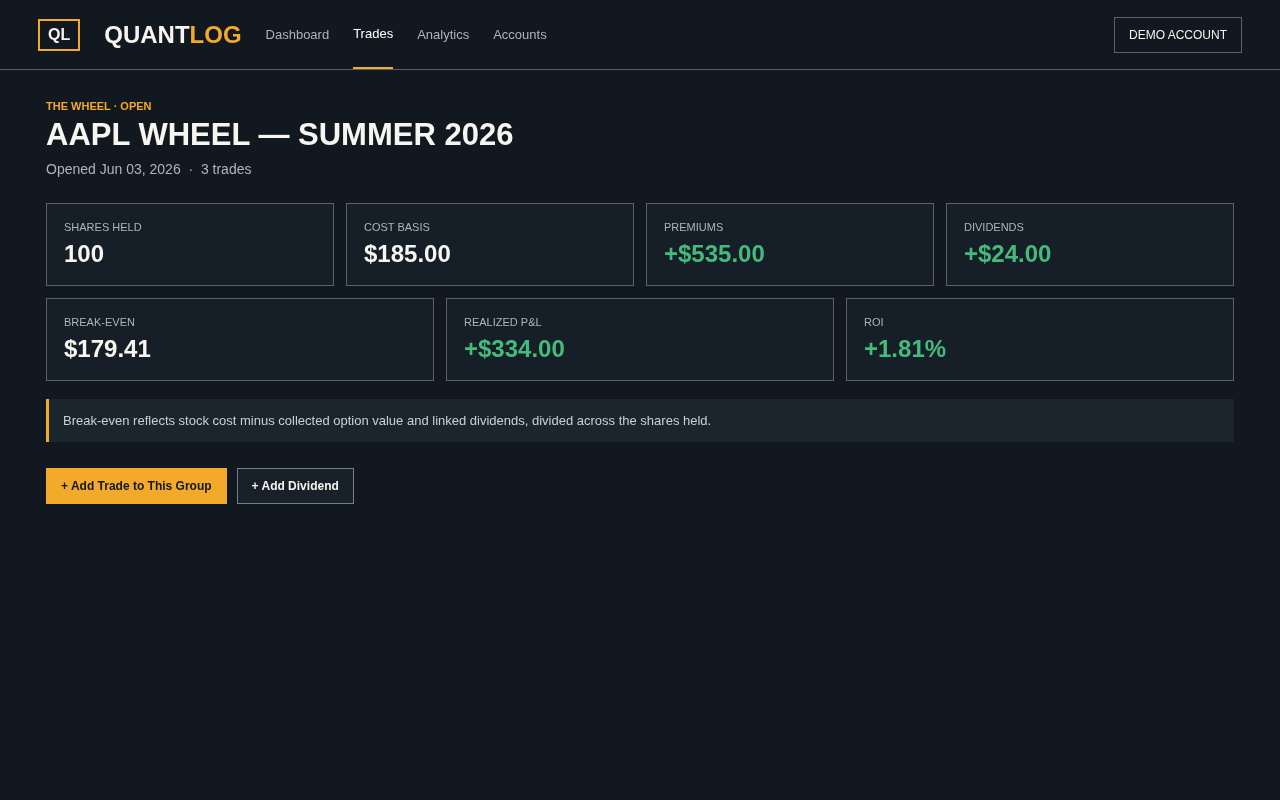
Open the group to see its combined metrics. Premiums shows the net option value collected across linked entries. Cost Basis shows the average purchase cost of shares. Break-even reflects the group’s effective share cost after option results and linked dividends, while Realized P&L also includes completed trade results and dividends.
- Credits received are positive; debits paid are negative
- When shares are held, break-even is stock cost minus net option value and dividends, divided by shares held
- Premiums and Realized P&L differ: an opening credit is not necessarily the final profit after the option closes
Keep every new cycle in the same group
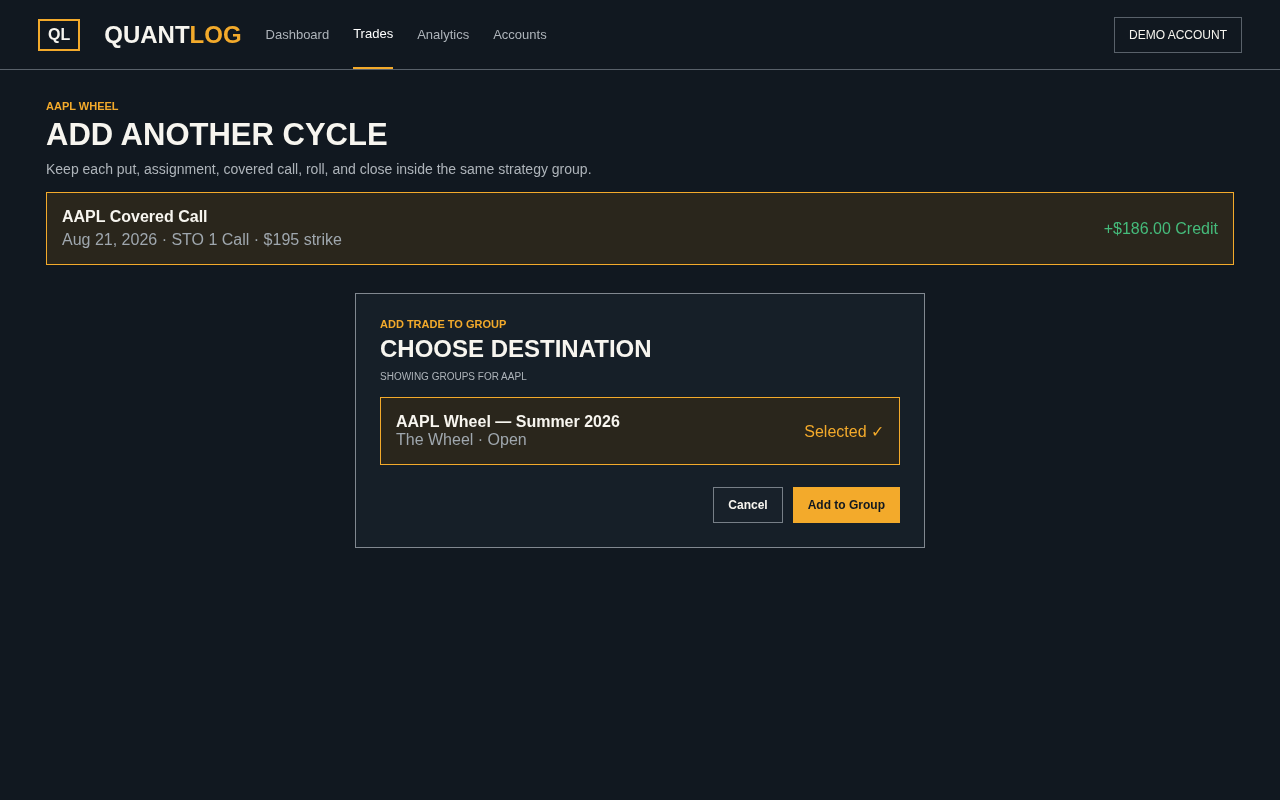
A Wheel evolves over time. From the group page, choose Add Trade to This Group when entering the next put, covered call, roll, or stock transaction. You can also select a standalone trade on Trades and choose Add to Group. QuantLog recalculates the group when linked activity changes.
- After assignment, keep the shares and future covered calls in the original Wheel group
- For a Covered Call, add each replacement or rolled call to the group containing the shares
- Use an existing open group that matches the trade symbol
Link dividends and review the full history
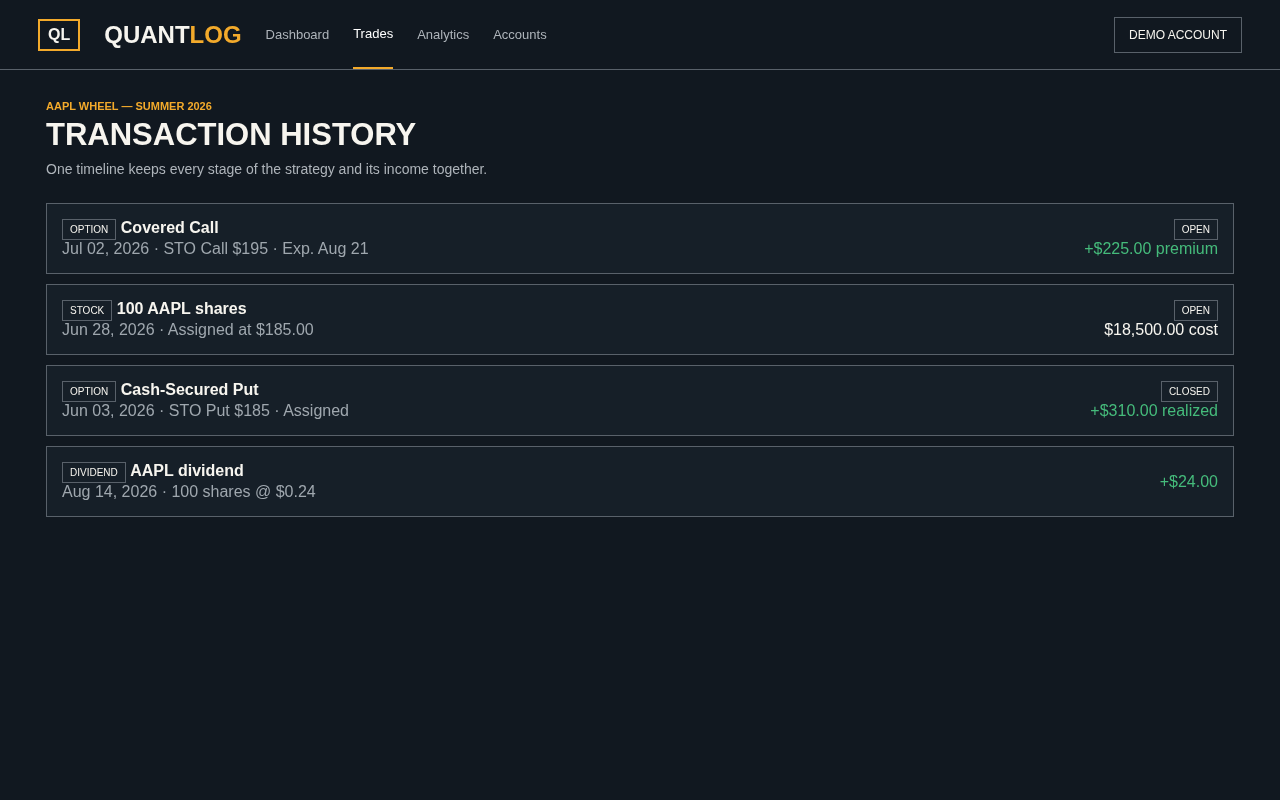
Dividends received while holding the shares belong to the same strategy history. Add one from the group page or select an existing dividend and link it. The history then shows the put, assignment or stock purchase, covered calls, and dividends in one timeline.
- Linked dividends contribute to Realized P&L
- When shares are held, dividends reduce the displayed break-even
- Closed option cycles stay in the history while the next cycle remains open
Apply the same method to a Covered Call
For a Covered Call, group the stock purchase or assigned shares with the short call sold against them. Add later calls to the same group as they expire, close, or roll. This keeps each premium connected to the capital committed to the shares.
- Keep the shares and calls for one symbol and one continuing campaign together
- If shares are called away, include that stock exit so the group records the final result
- Start a new group when you intentionally begin a separate campaign
Fix a group without deleting its trades
Use Unlink to remove one transaction, Move to Group to place it elsewhere, or Unlink All to break the group apart. You can rename a group at any time. Deleting the group removes the container but leaves its trades as standalone entries.
- Moving or unlinking activity recalculates the affected group totals
- Keep symbols separate even if Add to Group only displays a mismatch warning
- Review remaining shares and open calls after correcting an assignment or roll
Frequently asked questions
Which trades should be in the same group?
Group one continuing strategy on one symbol: its short puts, assigned or purchased shares, covered calls, stock exits, and related dividends. Use separate groups for separate campaigns or symbols.
Can a group contain stock, options, and dividends?
Yes. The stock, option cycles, and dividends can all contribute to one Wheel or Covered Call history and its combined metrics.
How does QuantLog calculate premium collected and break-even?
Option credits add to premium and option debits reduce it. With shares held, break-even reflects stock cost minus the net option result and linked dividends, divided by the shares. Closed options use their completed result, so this can differ from simply subtracting the opening credit.
What happens after assignment or when shares are called away?
Keep the assignment, shares, and later calls in the same Wheel group. If shares are called away, include the stock exit there too so the complete campaign result is recorded.
Can I move a trade to another group?
Yes. Select trades from the same group and use Move to Group, or unlink a trade and then add it to another matching group.
Does deleting or breaking apart a group delete its trades?
No. Unlink All or deleting the group leaves the trades as standalone entries. Deleting an individual trade is a separate action.